MTN NAMCHAT4.97.0
Publisher Description

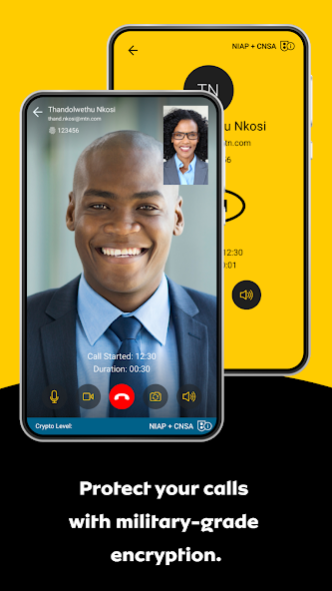


MTN NAMCHAT enables security for communications that exceeds the standards for US Top Secret.
Secure Instant Messaging
MTN NAMCHAT provides secure instant messaging with the ability to send photos, videos, voice notes, and large files of any kind. All messages and files are end-to-end encrypted with a new key generated for every message or file sent. MTN NAMCHAT’s enhanced Data at Rest encryption protects all files and media stored within the app.
Group messaging for collaboration and file-sharing can be created locally by the user on their device.
Secure Voice and Video Calls
MTN NAMCHAT voice and video calls are fully encrypted end-to-end, and routed through the mobile device’s data connection with signal obfuscation. Advanced codecs ensure HD quality with minimal data and battery use, even across low-bandwidth mobile or wireless networks.
Secure calls can be made over any IP-based network, including 5G, 4G/LTE, 3G/HSDPA, 2G/EDGE, WiFi, and satellite networks, with full authentication of all parties on a call to eliminate the risks of impersonation through Caller ID spoofing.
Secure Conference Calls
A conference bridge can be established instantly from the MTN NAMCHAT app by creating a group of contacts and hitting the call button. With only mutually authenticated, authorised users, MTN NAMCHAT conference calls eliminate the need for participant PINs and passwords.
Works on Any Device
With native client apps for Android smartphones/tablets, and no additional hardware dependencies, MTN NAMCHAT can be downloaded instantly for immediate use.
The ability to work anywhere, from any device, with file sharing, messaging, and voice/video calling, allows users to collaborate instantly and securely.
End-to-End Encryption
MTN NAMCHAT uses double-layer encryption in an end-to-end configuration, with a new key for every call and message. The system is modular and adheres to best practice cryptographic standards/protocols, powered by a crypto core that is FIPS 140-2 validated. With MTN NAMCHAT, data is secured end-to-end using Elliptic Curve and Symmetric-Key Cryptography.
About MTN NAMCHAT
The company that develops MTN NAMCHAT is Seecrypt Group, Inc.. The latest version released by its developer is 4.97.0.
To install MTN NAMCHAT on your Android device, just click the green Continue To App button above to start the installation process. The app is listed on our website since 2023-10-17 and was downloaded 30 times. We have already checked if the download link is safe, however for your own protection we recommend that you scan the downloaded app with your antivirus. Your antivirus may detect the MTN NAMCHAT as malware as malware if the download link to com.seecrypt.mtn is broken.
How to install MTN NAMCHAT on your Android device:
- Click on the Continue To App button on our website. This will redirect you to Google Play.
- Once the MTN NAMCHAT is shown in the Google Play listing of your Android device, you can start its download and installation. Tap on the Install button located below the search bar and to the right of the app icon.
- A pop-up window with the permissions required by MTN NAMCHAT will be shown. Click on Accept to continue the process.
- MTN NAMCHAT will be downloaded onto your device, displaying a progress. Once the download completes, the installation will start and you'll get a notification after the installation is finished.
Program Details
System requirements
Download information
Pricing
Version History
version 4.97.0
posted on 2023-10-17
version 3.139.3
posted on 2020-12-21
What's new
- Reorganized settings categories
- Introducing Call Rating
- Updated conversation screen
- Added checkbox to message selection mode
- Updated onboarding screens, EULA, Privacy Policy and FAQ
Bug fixes
- Fixed default profile picture letter color on the messaging screen
- Fixed low contrast status bar during calls
- Fixed link color in outgoing/incoming bubble
- Fixed conversations with new messages now appear correctly at the top of the chats hub
- General stability improvements
version 3.139.1
posted on 2020-12-07
What's new
- Reorganized settings categories
- Call Rating
- Updated conversation screen with a new toolbar, chat bubbles, and bottom bar styles, along with a security level banner
- Added checkbox to message selection mode
- Updated onboarding, sign in, create an account, and account created pages
- Updated EULA, Privacy Policy, and FAQ
Bug fixes
- Conversations with new messages now appear correctly at the top of the chats hub
- Minor UI improvements
- General stability improvements
version 3.131.1.4131001
posted on 2020-11-04
- Correct screen is now displayed when receiving a call
- Voice call user interface has been updated
- Group member's list now displays correctly a recently added member
- Busy call notifications are now added to the unread messages count in the chats hub
- General stability improvements
version 3.127.0.4127000
posted on 2020-09-14
- Incoming call popup doesn't appear in the middle of the call anymore
- Attachments now upload correctly on a fresh installation
- Files without extension don't behave as backup files anymore
- Message are now resent automatically after key exchange happens
- Group member's list now loads correctly in the group profile page
- Fixed an issue where outgoing calls didn't have a ringing sound
- General stability improvements
version 3.112.1.4112001
posted on 2020-08-13
What's new:
- Added some useful information in the logs
Bugfixes:
- Stability improvements
version 3.108.5.4108005
posted on 2020-06-26
Bugfixes:
- Scrolling to top now fetches new messages correctly
- Conversations now open on the correct message
- Multiple selection now works clicking on any part of the chat bubble
- Acknowledge button now works correctly after cancelling a backup
- Cancelling a backup now displays the correct message
- Sharing a screenshot now sends it as an image instead of general file
- Unread messages aren't hidden behind the chat input bar upon entering a conversation anymore
- Stability improvements
version 3.107.28.4107028
posted on 2020-05-14
What`s new:
- Redesigned chat screen.
- Multiple selection on the chat screen.
Bugfixes:
- Fixed an issue with outgoing attachments not uploading if the user left the chat screen.
- Fixed an issue where the voice note lock was not working with the keyboard active.
- Fixed an issue causing notifications to display a wrong number of incoming messages.
- General bug fixes and stability improvements
version 3.106.4.4106004
posted on 2020-04-14
Whats new:
- User can now send diagnostics logs as an attachment.
Bugfixes:
- Fixed an issue causing poor audio quality on some devices.
version 3.106.2.4106002
posted on 2020-03-31
What`s new:
- Enabled Pinlock Kill code.
Bugfixes:
- General bug fixes and stability improvements
